
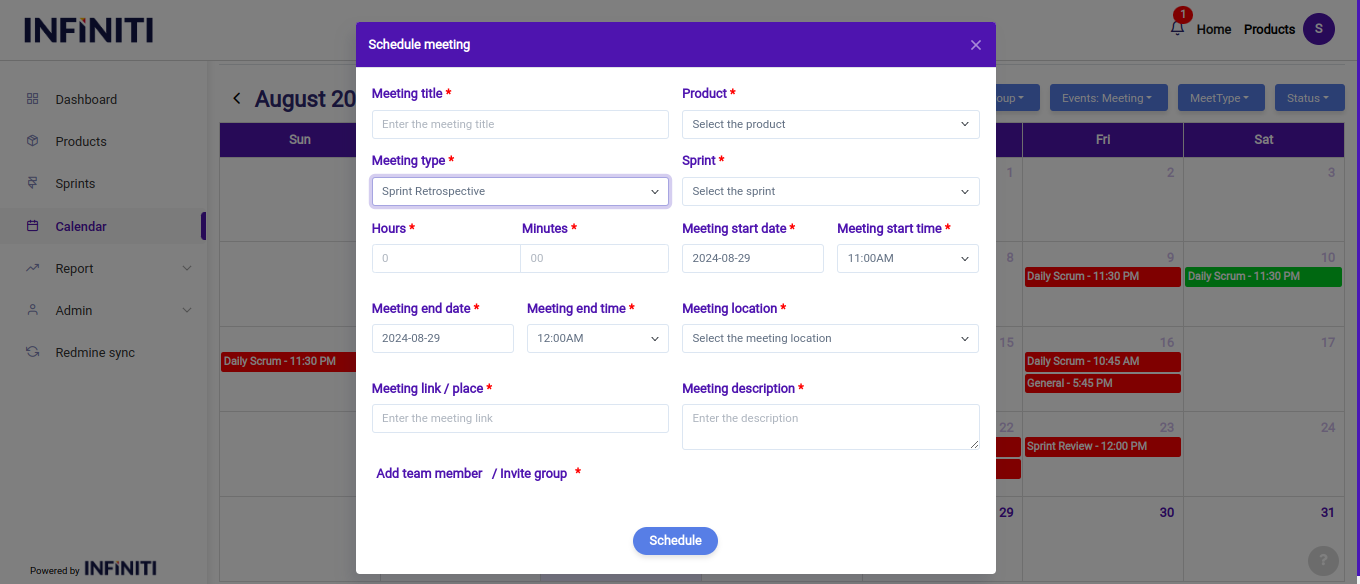
In this scenario, when a user selects the present date in the calendar, a modal will appear where they can create a new “Sprint Retrospective meeting”.
Functionality:
i. Meeting details:
- Meeting title: The title should clearly indicate the focus of the meeting, such as “Sprint Retrospective – Sprint X” or “Team Reflection – Sprint Y.”
- Product: The product associated with the sprint is selected from a dropdown list, ensuring the discussion is relevant to the specific project or product the team is working on.
- Meeting type: “Sprint Retrospective” is selected as the meeting type, distinguishing it from other agile meetings like sprint reviews or daily scrums.
- Sprint name: The sprint under review is selected, ensuring that the retrospective is focused on the correct sprint and its particular challenges and successes.
- Durations: The time for the sprint retrospective is set in hours and minutes, with enough time allocated for the team to thoroughly discuss and reflect on the sprint.
- Meeting start date & time: The date and time for the sprint retrospective are set, ensuring that all team members can participate in this critical reflection and planning session.
- Meeting location & link: The physical location or online meeting link (e.g., google, teams) is provided, ensuring that all team members know where and how to join the retrospective.
ii. Team members:
- The sprint retrospective is typically attended by the scrum team, including the product owner, scrum master, and development team members. Users can select members individually or choose from predefined groups, ensuring that all relevant team members are included in the discussion.
- The focus on team participation is crucial for an effective retrospective, as it allows everyone to contribute their perspectives and ideas for improvement.