
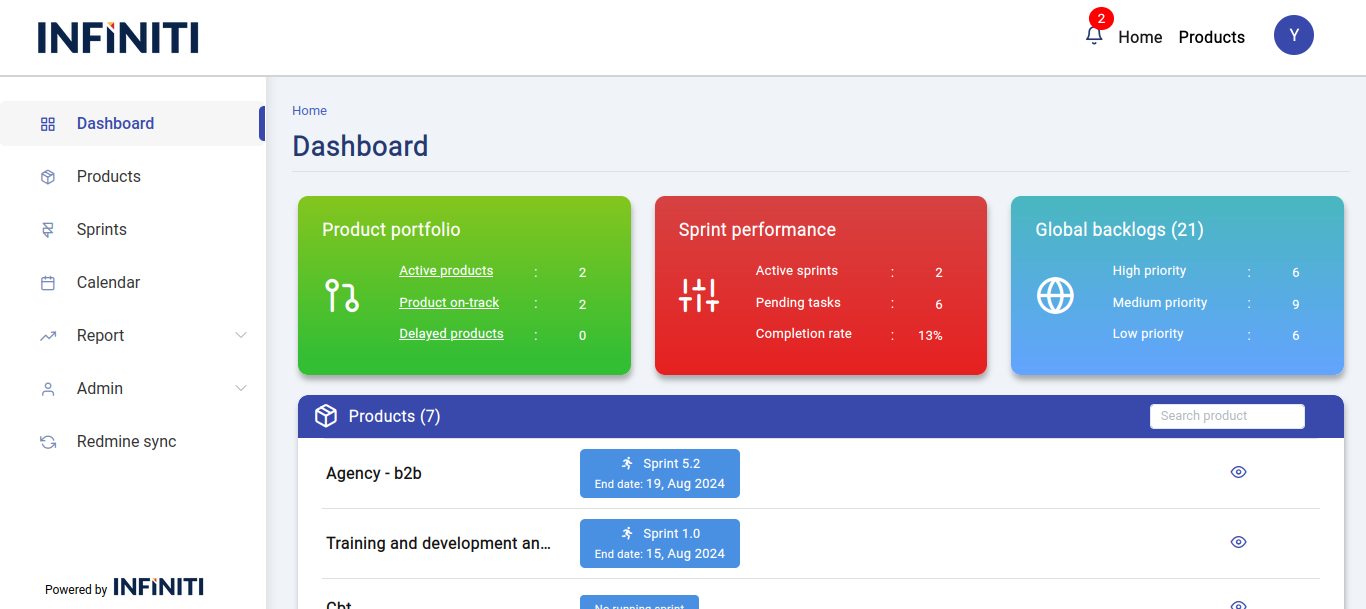
The multiple product dashboard page shows the overall product details for the user. This page displays active products, highlighting those that are delayed or on track, along with active sprints, pending tasks with their completion percentage, and incomplete backlogs with priority.
Functionality:
i. Product overview:
- This page retrieves and displays all the products and their details associated with the user, providing an overall view of the user’s product portfolio.
ii. Product portfolio card:
- The product portfolio card showcases the user’s active products. If a product is delayed, it is categorized as a delayed product; otherwise, it is considered an on-track product.
iii. Sprint performance card:
- The sprint performance card highlights the active sprints, showing the pending tasks and the completion rate for that sprints. This helps users track progress and identify areas that may need attention.
iv. Global backlog card:
- The global backlog card presents the backlog items prioritized by urgency. This allows users to see the most pressing tasks and manage their workload effectively.
v. Product list:
- The product list displays all the user’s products, each with an associated sprint and a view icon. Clicking the view icon takes the user to the single product dashboard for that specific product.
vi. Search functionality:
- Users can utilize the search bar to find specific products by name, making it easy to navigate through the list of products.
vii. Sprint details:
- Users can click on any sprint within the dashboard to view detailed information about that sprint, including tasks, progress, and associated backlogs.