
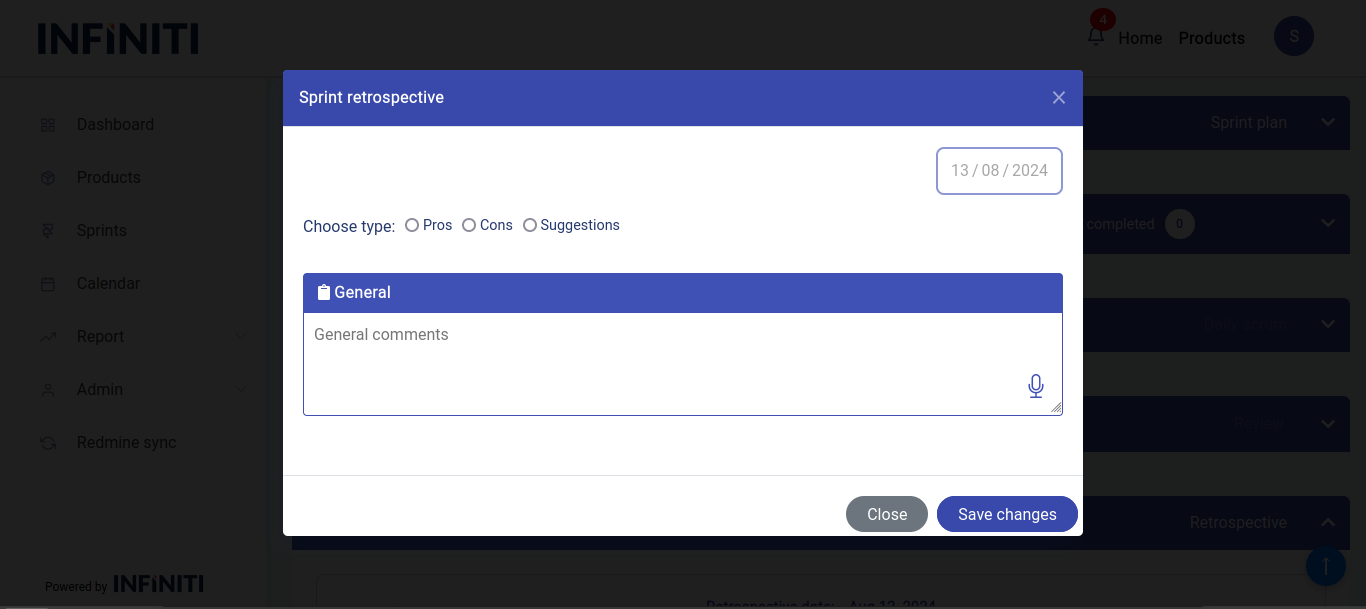
The Sprint retrospective page is used to insert retrospective details for the sprint, by clicking the ‘Sprint Retrospective’ button the below modal is opened.
Functionality:
i. Accessing the sprint retrospective modal
- Sprint retrospective button: Clicking retrospective button in sprint view page will open the Sprint Retrospective modal.
ii. Modal details
- Date: Automatically set to the current date and cannot be changed.
- Entries:
- Pros: Enter the positive aspects and successes of the sprint.
- Cons: Enter any issues or challenges encountered.
- Suggestions: Provide recommendations for improvement in future sprints.
- Simultaneous entry: All three sections can be filled out and submitted simultaneously; there is no need to enter them separately.
- One-time submission: Sprint retrospective can be submitted only one time.
iii. Post-submission
- Viewing: Once the sprint retrospective is submitted, it will be available in the sprint history.
- Email notification: An email will be sent to all sprint members.