
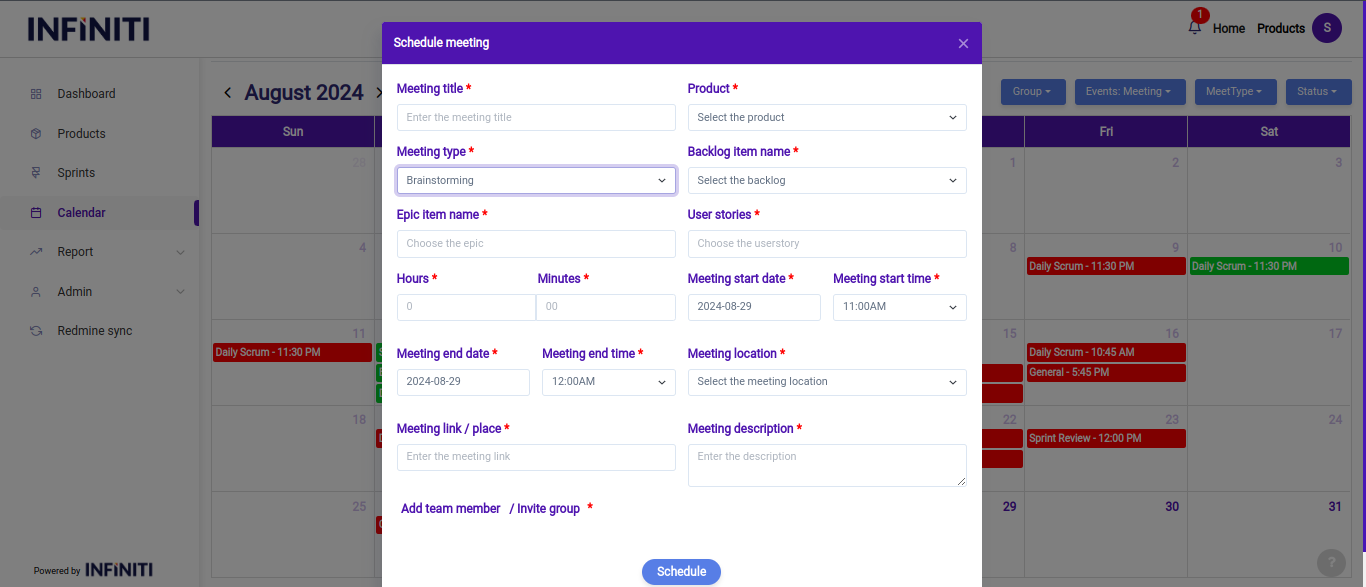
In this scenario, when a user selects the present date in the calendar, a modal will appear where they can create a new “Brainstrom meeting”.
Functionality:
i. Epic dropdown for brainstorming:
- The epic dropdown is designed to show only the user stories that are “Ready for brainstorming” status. If there are no user stories or status other than ready for brainstorming that meet the criteria for brainstorming, the dropdown will display a message like “No epics available”. This clear feedback helps users understand the current state of their projects and whether they need to change the ready for brainstroing status before scheduling a brainstorming meeting.
ii. Filtering brainstorming meetings by status:
- Users have the ability to filter brainstorming meetings by their status—upcoming, ongoing, or completed. This functionality allows users to easily manage and navigate through different stages of their brainstorming sessions.
- Upcoming: Users can view all brainstorming meetings that are planned for the future. This helps in preparing for upcoming discussions and collaborations.
- Ongoing: Users can see meetings that are currently in progress, ensuring they can join or manage active sessions.
- Completed: This view shows all past brainstorming meetings, allowing users to review what was discussed or revisit completed sessions for reference.
- Users have the ability to filter brainstorming meetings by their status—upcoming, ongoing, or completed. This functionality allows users to easily manage and navigate through different stages of their brainstorming sessions.