
Scrum guide

Add Milestone

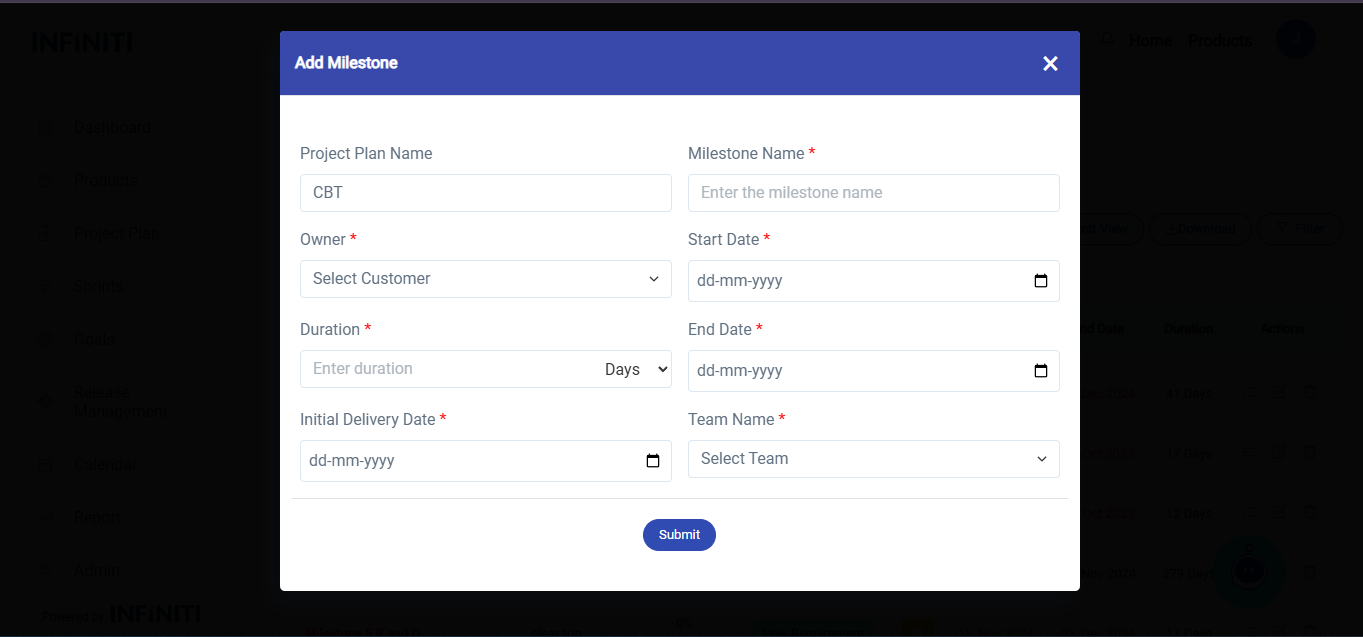
Add Milestone Form Explanation
The “Add Milestone” form is designed to facilitate the creation of new milestones within the system, ensuring that all necessary details are captured in a structured manner. The form consists of the following key components:

  • Project Plan Name:
    A field to input the unique name of the project plan, which is selected by default.

  • Milestone Name:
    A field to input the unique name of the milestone.

  • Customer Name (Owner Name):
    A dropdown menu to select the customer associated with the project.

  • Start Date and End Date:
    Date pickers to define the project timeline. When dates are selected, any holidays within this range will be displayed to avoid scheduling conflicts.

  • Initial Delivery Date:
    A date picker to specify the first expected delivery to the customer.

  • Duration:
    Automatically calculated from the start date, either in the number of days or the number of hours required.

  • Submit Button:
    A button to save the entered data. Upon submission, the data is added to the system, and the new milestone automatically appears in the milestone list view.
Features

  • Dynamic Holiday Display:
    When selecting start and end dates, the form automatically identifies and highlights holidays within the selected range. This helps ensure that project schedules account for non-working days.

  • Real-Time Updates:
    After submission, the newly created project plan is displayed in the list view without requiring the user to refresh the page. This seamless integration enhances user efficiency.


User Flow

  • The user fills in all mandatory fields in the form, ensuring the milestone details are complete.
  • The system highlights any holidays between the start and end dates to help in planning.
  • Once the form is submitted, the milestone is saved, and the updated list view reflects the newly added milestone plan.

Benefits

  • Ensures all relevant milestones details against the selected project are captured in one place.
  • Helps users avoid scheduling conflicts by considering holidays.
  • Provides an intuitive and efficient workflow by automatically updating the milestone list view.
 
Shopping Basket