
The Sprint list is the first page of the sprint module and displays a list of sprints which was previously created by the respective product owners / managers.
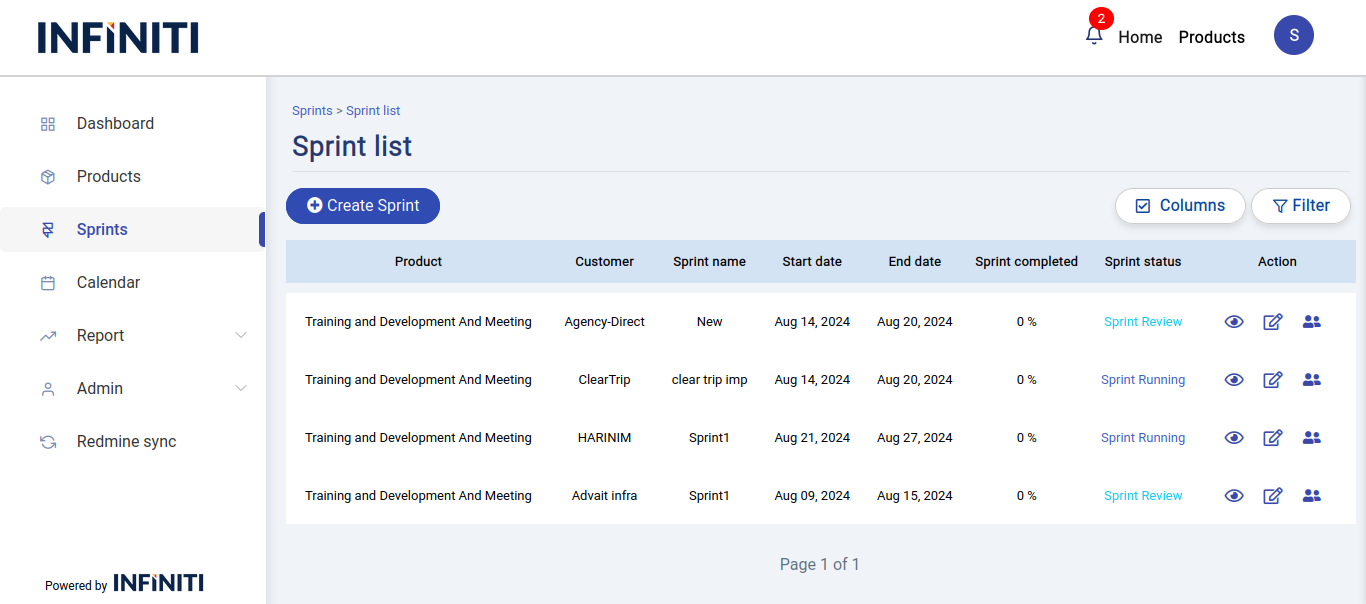
Functionality:
i. Sprint display
- Filtered by product: Only sprints linked to the user’s product are shown.
No data message: Displays ‘No data found’ if there are no sprints.
ii. Buttons visibility and functionality
Create sprint: Visible only to authorized users for creating a sprint.
Sprint view: Available to all users for viewing a sprint.
Edit sprint: Visible only to authorized users for editing a sprint.
Schedule meeting: Visible only to authorized users for scheduling a meeting for sprint.
iii. Sprint columns
- The list displays the following details by default:
- Product name
- Customer name
- Sprint name
- Start date
- End date
- Sprint completion percentage
- Sprint status
- Product name
- The user can change the data column view by clicking the “Columns” button.
- The list displays the following details by default:
iv. Sprint status transition
Planned: Initial status (Yellow). Set when the sprint is created.
Running: Status changes to this when the sprint starts (Dark Blue).
Review: Status changes to this after the sprint review meeting (Light Blue).
Retrospective: Status changes to this after the sprint retrospective meeting (Black).
Completed: Final status after all steps are completed (Green).
v. Page features
Columns button: Customize visible columns. Default columns include product name, customer name, sprint name, start date, end date, sprint completed, and sprint status. Additional columns can be selected such as total estimated hours, created by, sprint version, duration, and others.
Filters button: Allows users to filter sprints based on from/to dates, product name, customer name, and sprint status.