
- Description
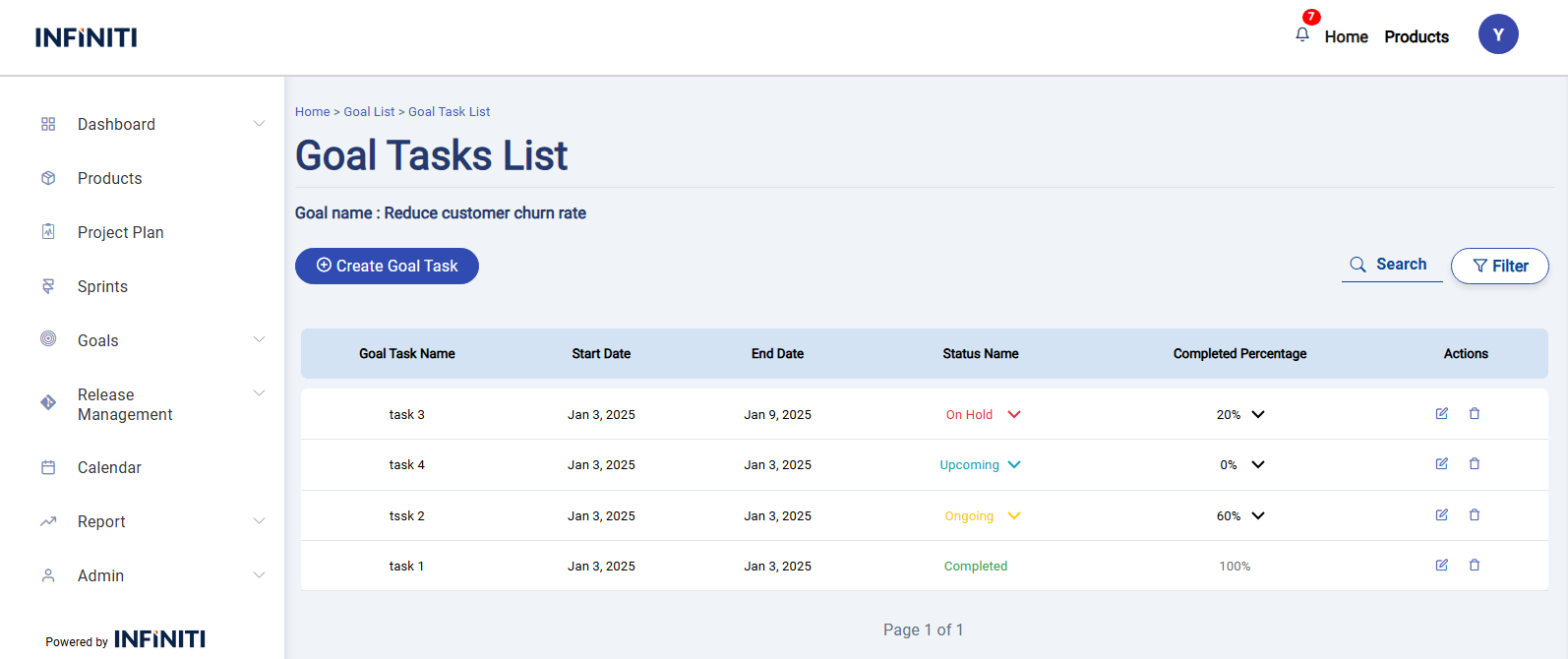
- The Goal Tasks page is part of the Scrum tool. It provides users with a detailed view of all tasks associated with a selected goal. Users can view, edit, delete, or add tasks directly from this page.
Goal Tasks list page
- The task list on the Goal Tasks page shows the following fields for each task:
- Goal Task Name: The name of the task.
- Start Date: The start date of the task.
- End Date: The end date of the task.
- Status: The current status of the task (e.g., Ongoing, Completed, On Hold, Upcoming).
- Completed Percentage: The progress of the task as a percentage.
- The task list on the Goal Tasks page shows the following fields for each task:
Functionality :
i. Buttons and Visibility
- Edit Button – Redirects to the Edit Task Page, where all fields are pre-filled with the current task’s data and Allows authorized users to update task details.
- Delete Button – Displays a confirmation prompt before deletion to prevent accidental data loss.
- Create Goal Task Button – Redirects to the Add Task Page, where users can input the task details.
ii. Page Features
- Search – Enables users to quickly locate a task by its name
- Filter – Allows filtering tasks based on criteria like status and from date and end date,
- Pagination – Facilitates navigation when dealing with a large number of tasks.