Scrum guide
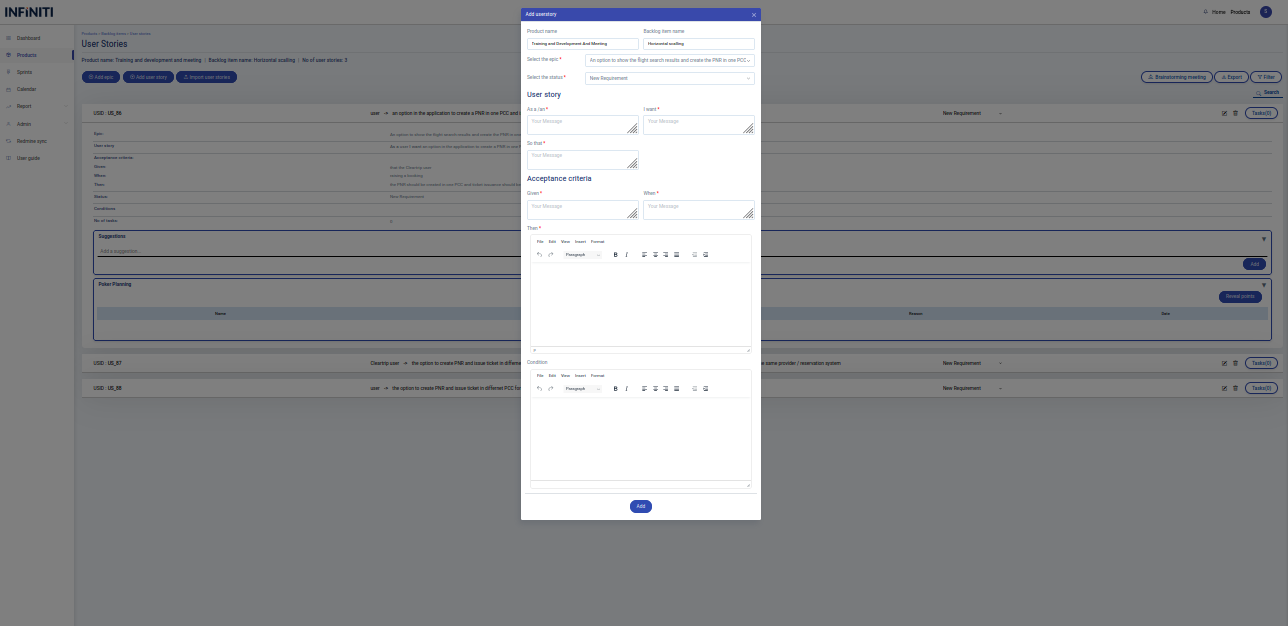
Add User Story
The “Add User Story” button is used to add a new user story.
By clicking the
‘add user story’ button the add form will be displayed.
Functionality :
i. Button Activation
Add user story button
:
Only authorized users can access “Add user story” button.
ii. Mandatory Fields
Epic
Status
As a/an
I want
So that
Given
When
Then
iii. Field Specifications
Epic :
Drop-down list to select the epic of the user story.
Status
: Drop-down list to select the status of the user story.
As a/an
: User-defined field for entering the As a/an.
I want
: User-defined field for entering the I want.
So that
: User-defined field for entering the so that.
Given
: User-defined field for entering the “Given” of the acceptance criteria.
When
: User-defined field for entering the ‘When” of the acceptance criteria.
Then
: User-defined field for entering the “Then” of the acceptance criteria.
Condition
: Text area for entering the condition.
Shopping Basket