
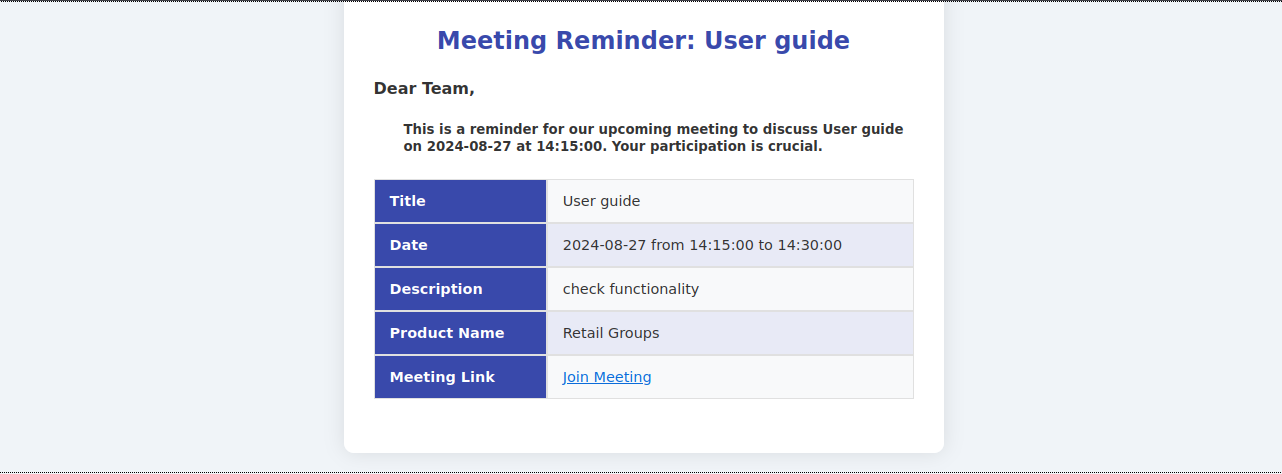
When a meeting is scheduled, selected members and group members will receive an email with all essential details to ensure they are informed and prepared. The email includes the following components:
Functionality:
i. Recipients:
- Selected members and group members: The email notification will be sent to all members who are either directly invited to the meeting or are part of the associated group. This ensures that everyone who needs to attend or be aware of the meeting receives the necessary information.
ii. Email content:
- Title: The subject line of the email will clearly state the title of the meeting. This helps recipients quickly identify the purpose of the meeting.
- Date: The email will include the scheduled date of the meeting, allowing recipients to plan their attendance accordingly.
- Description: A brief description of the meeting will be provided, giving recipients an overview of the meeting’s agenda, objectives, or key topics.
- Product name: If the meeting is associated with a specific product, the email will include the product name. This helps recipients understand the context and relevance of the meeting.
- Meeting link: A link to join the meeting will be included in the email. This link will direct recipients to the virtual meeting room or platform where the meeting will take place.
iii. Join meeting button:
- The email will feature a “Join meeting” button that recipients can click to easily access the meeting. This button provides a direct link to the meeting, simplifying the process of joining and ensuring that participants can attend the meeting with minimal hassle.