
In this scenario, when a user selects the present date in the calendar, a modal will appear where they can create a new “Daily Scrum meeting”.
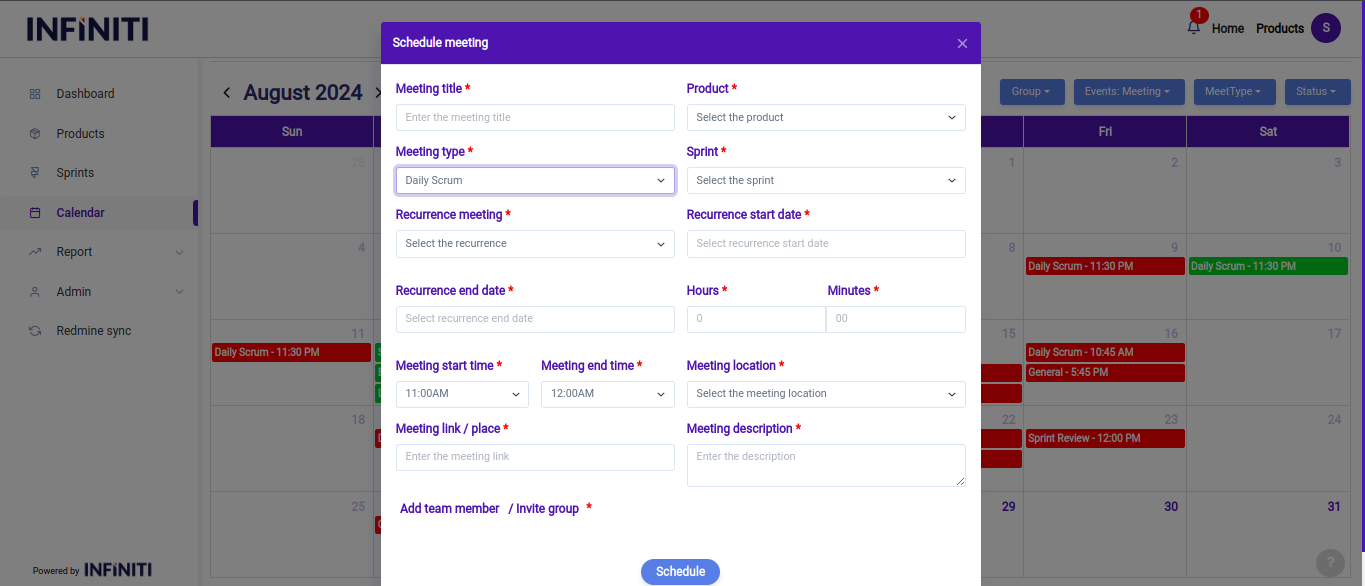
Functionality:
i. Meeting details:
- Meeting title: The title should clearly reflect the focus of the daily scrum, such as “Daily standup – Sprint X” or “Team sync – Project Y.”
- Product: The product associated with the meeting is selected from a dropdown list, ensuring the meeting is relevant to the specific project or product under development.
- Meeting type: “Daily Scrum” is selected as the meeting type to distinguish it from other types of meetings like brainstorming or sprint reviews.
- Sprint name: The sprint associated with the daily scrum is selected, ensuring the meeting is tied to the current sprint’s progress and objectives.
- Recurrence meeting: This setting indicates whether the daily scrum is a recurring event, which is typically the case in agile methodologies.
- Recurrence dates: Users can specify the recurrence start and end dates, defining the period over which the daily scrum will be held regularly.
- Durations: The time for the daily scrum is generally brief (e.g., 15 minutes), so users can set the duration in hours and minutes.
- Meeting start date & time: The start date and time of the meeting are crucial to keep the team aligned on when the daily scrum will occur. The start time is usually set in 15-minute intervals to match the typical brief nature of this meeting.
- Meeting end time: This field allows setting an expected end time, reinforcing the importance of keeping the meeting short and focused.
- Meeting location & link: The physical location or online meeting link (e.g., google, teams) is provided to ensure all participants know where and how to join the meeting.
ii. Team members:
- Users can select individual team members or choose from pre-defined groups to add to the daily scrum meeting. This ensures that all relevant team members are included and can participate in the discussion.
- The ability to manage participants helps in ensuring that the right people are involved in the daily synchronization, contributing to the effectiveness of the scrum.
iv. Filtering and managing scrum meetings:
- Similar to other meetings, users can filter daily scrum meetings by status (upcoming, ongoing, or completed). This helps in managing the daily routine effectively:
- Upcoming: Future daily scrum meetings can be viewed, helping the team prepare and know what’s ahead.
- Ongoing: The current day’s scrum meeting can be accessed, allowing team members to join or manage the session.
- Completed: Past scrum meetings are available for review, providing insights into what was discussed and any follow-up actions that were taken.
- Similar to other meetings, users can filter daily scrum meetings by status (upcoming, ongoing, or completed). This helps in managing the daily routine effectively: