
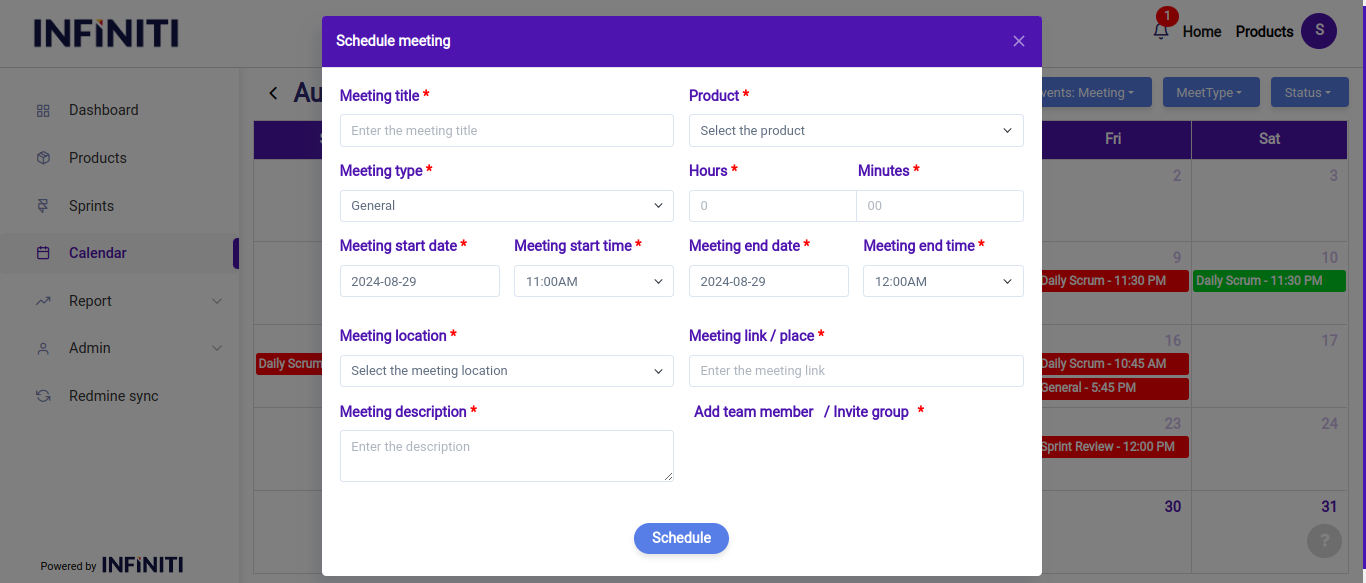
In this scenario, when a user selects the present date in the calendar, a modal will appear where they can create a new “General meeting”.
Functionality:
i. If the user selects “General” as the meeting type, they will need to fill out all mandatory fields such as the meeting title, date, time, members and any other required details before clicking the “Schedule button” to confirm the meeting.
ii. Once the meeting is scheduled, it will be added to the calendar and can be viewed based on its status. The status dropdown allows users to filter and view only the general meetings that are upcoming, ongoing, or completed. This filtering helps in organizing and managing meetings efficiently by focusing on meetings that are relevant to the current context:
- Upcoming: Meetings that are scheduled for future dates and have not yet occurred.
- Ongoing: Meetings that are currently in progress.
- Completed: Meetings that have already occurred and are finished.
iii. Additionally, when a user clicks on a general meeting in the calendar, they can view the details of that meeting. If the user is the meeting creator, options to edit or cancel the meeting will also be available. This functionality helps in maintaining a streamlined and user-friendly scheduling experience.