
The events – meetings page displays only meetings in the calendar, providing a focused view specifically for managing and tracking meetings.
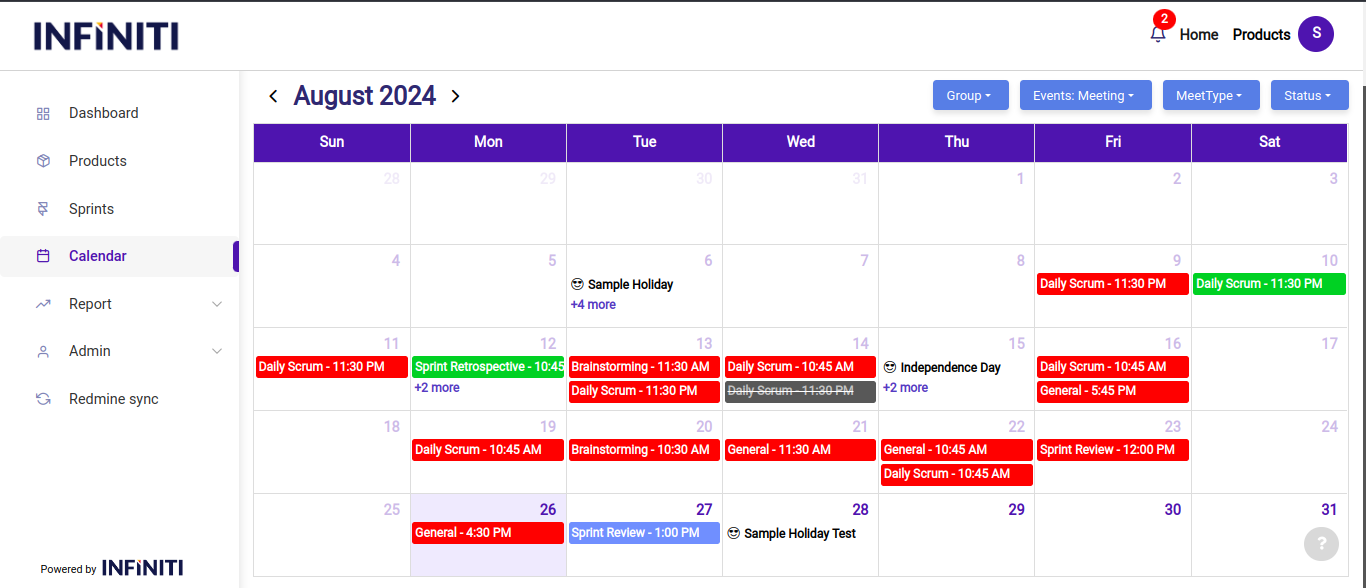
Functionality:
i. Color indicators:
- Red: Indicates that the meeting has been completed, but the time log in redmine has not been finalized. This serves as a reminder to log the time, ensuring accurate project tracking.
- Blue: Indicates that the meeting is upcoming, helping users to easily identify and prepare for future meetings.
- Green: Indicates that the meeting is completed, marking it as successfully held and finalized.
- Grey with strikethrough: Indicates that the meeting has been canceled, making it clear that the event is no longer valid or required.
- Orange: Indicates that the meeting is currently ongoing, allowing users to see which meetings are in progress at any given moment.
ii. Each event is labeled with the meeting type and the starting time of the meeting, ensuring quick identification and better organization of daily schedules.
iii. MeetType dropdown:
- Located at the top of the calendar, the “Meet Type” dropdown allows users to filter and view specific meeting types such as
- General
- Brainstorming
- Daily scrum
- Sprint review
- Sprint retrospective.
- Located at the top of the calendar, the “Meet Type” dropdown allows users to filter and view specific meeting types such as
iv. Additional features:
- Users can quickly reschedule or update meeting details directly from the calendar by interacting with the events.
- The page allows for filtering meetings by different criteria, such as meeting type or status, making it easier to manage large numbers of meetings.
- Notifications or alerts can be integrated to remind users of upcoming meetings, ensuring no event is missed.