
The Sprint history can be viewed by clicking the ‘History’ button in the Sprint view page.
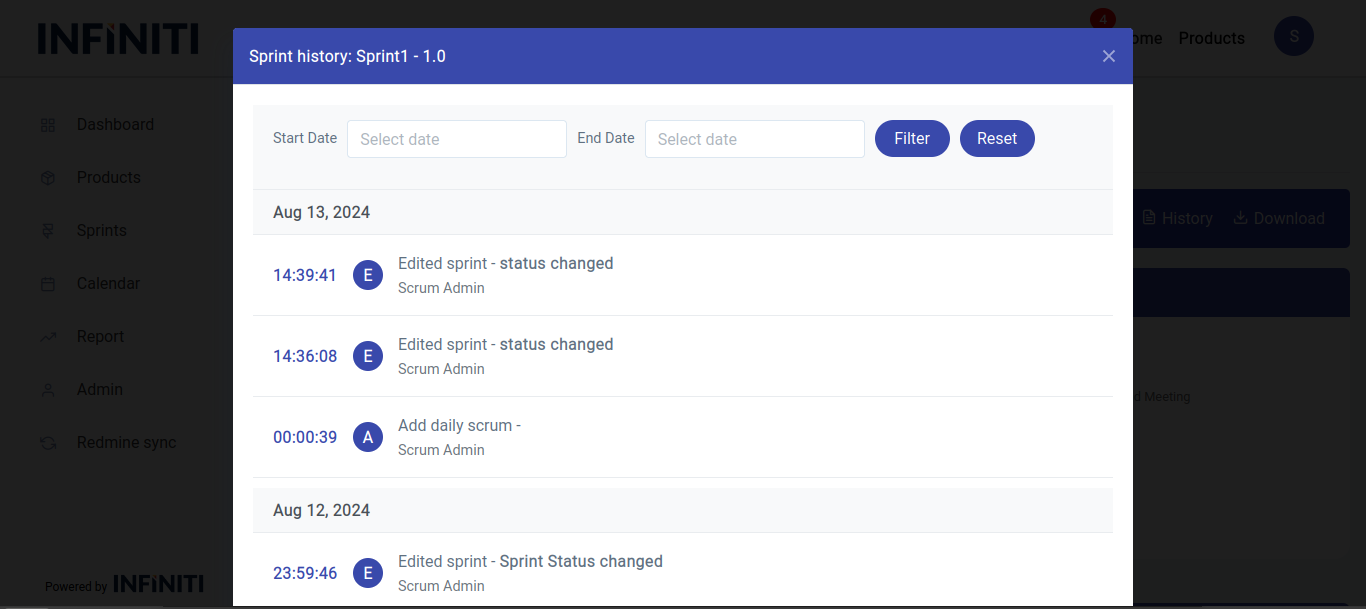
Functionality:
i. Accessing sprint history
-
- History button: Click history button to open the Sprint history modal.
ii. Viewing activities
-
- Activities displayed:
- Sprint creation: Details of when and who created the sprint.
- Editing: Information on changes made to the sprint, including who made the edits.
- Daily scrum updates: Entries for daily scrum meetings, including any updates or comments added.
- Sprint review updates: Details from sprint review meetings, including comments and status updates.
- Sprint retrospective updates: Information from the sprint retrospective, including pros, cons, and suggestions.
- Sprint planning status changes: Updates on the sprint planning status, including who made changes and when.
- Date and time: Each entry includes the date and time when the action was performed.
- User identification: The user who performed each action is displayed, providing clear accountability.
- Activities displayed:
iii. Filtering data
-
- Filters option: Allows users to narrow down the displayed data based on specific criteria.
- By date: View activities from a specific date.
- By date range: View activities within a specified range of dates.
- Filters option: Allows users to narrow down the displayed data based on specific criteria.